Knowledgebase


Feeding Three Single-Phase Rectifiers from a Three-Phase Board
Purpose
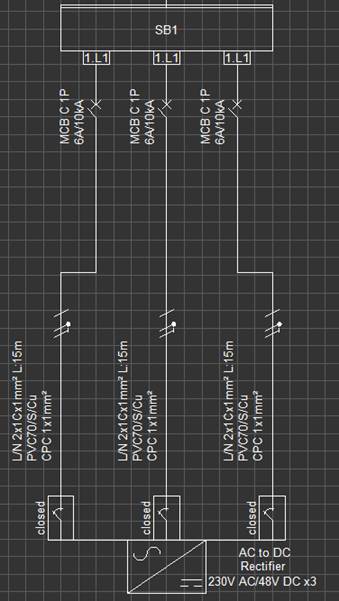
This article explains how to model three single-phase rectifiers being supplied from a three-phase distribution board in ElectricalOM, where each rectifier is fed by a different phase (L1, L2, and L3).
This arrangement is useful when using ElectricalOM’s built-in quantity setting for rectifiers instead of inserting three separate single-phase rectifiers.
Procedure
- Insert the Source and Switchboard
i. Insert a three-phase source into the project.
ii. Insert a three-phase switchboard and connect it to the source.
iii. Add a single-phase rectifier and connect it to the switchboard.
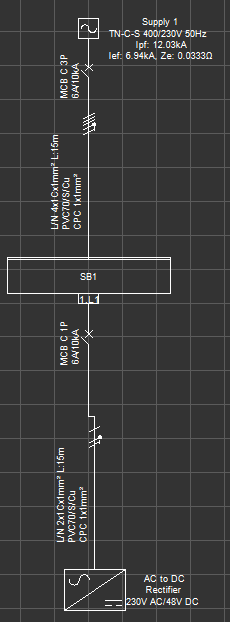
2. Create Additional Feeds from the Same Switchboard
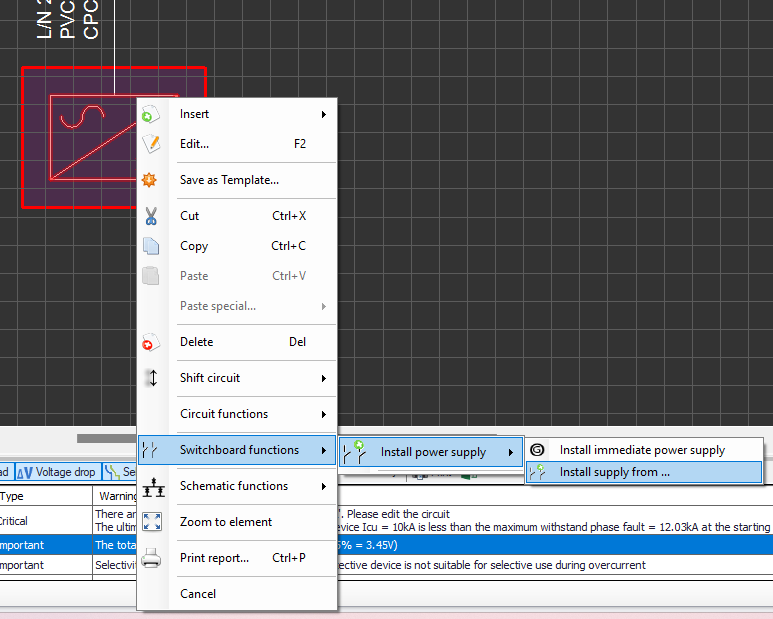
ElectricalOM allows you to feed the same rectifier multiple times from a single board. To do this:
i. Right-click on the rectifier.
ii. Select Switchboard settings.
iii. Choose Install power supply → Install supply from…
iv. In the selection window, choose the same switchboard.
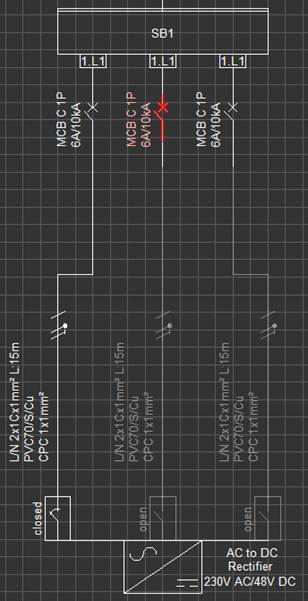
Repeat this process two more times to create three feeds from the same switchboard to the rectifier.

3. Enable Parallel Operation of Feeds
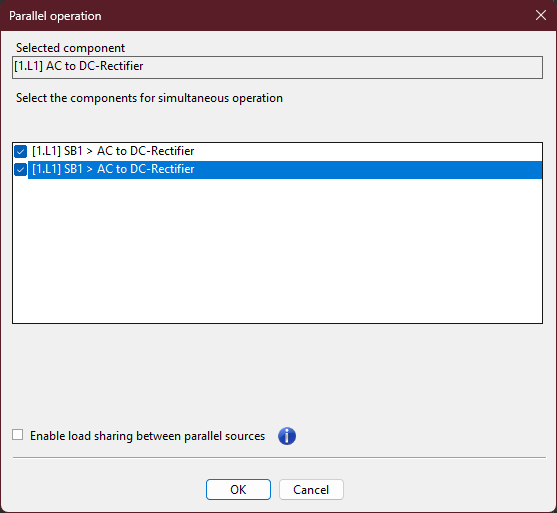
Once the feeds are created, they must operate simultaneously.
i. Select the rectifier.
ii. Open the Functions menu from the top toolbar.
iii. Select Parallel Source Operation.
iv. In the pop-up window, select the additional feeds so that all three operate in parallel.
v. Confirm to apply the setting.
4. Configure Rectifier Settings
Now configure the rectifier to represent three single-phase units working on different phases.
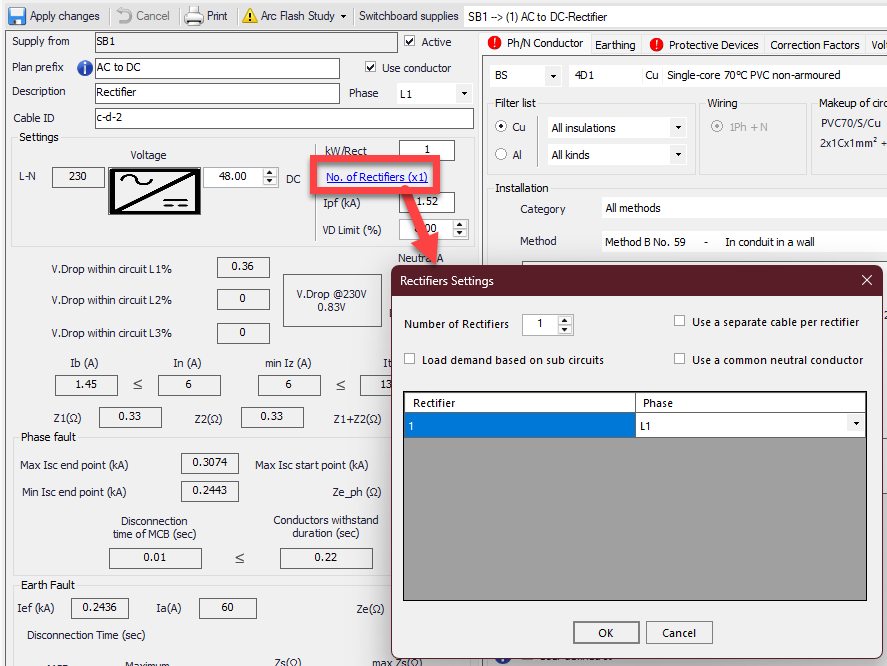
i. Open the Rectifier settings window.
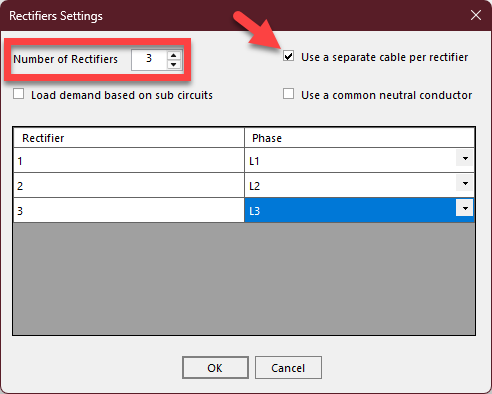
ii. In the Number of Rectifiers field, type 3.
iii. Tick Use separate cable per rectifier.
iv. Assign the phases as follows:
Rectifier 1 → L1
Rectifier 2 → L2
Rectifier 3 → L3
5. Verify the Configuration
After the setup is complete:
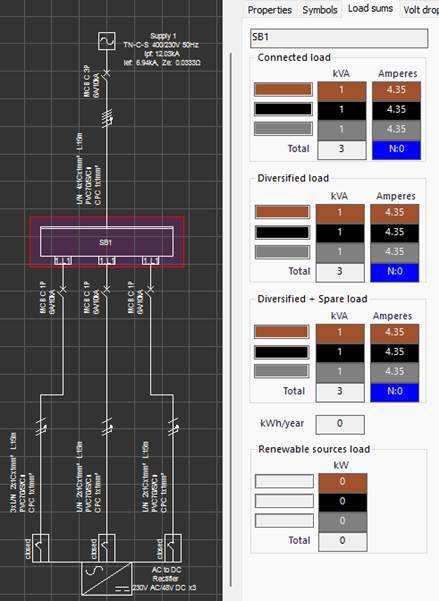
Confirm that the schematic shows three feeds connected from the switchboard to the rectifier.
Check that each phase carries the correct share of the total rectifier load.
Notes
This method allows accurate modelling of three single-phase rectifiers operating on separate phases without manually inserting three devices.
The Parallel Source Operation ensures all feeds are active simultaneously.
Using the “Use separate cable per rectifier” option allows correct current distribution and cable sizing for each rectifier.
Also Read
-
ElectricalOM Revit Sync Add-on Training Notes (Views: 1766)
-
Ring distribution systems (Views: 876)
-
CAD Plan Add-on Module User Manual (Views: 1680)
-
Quick Start Guide (Views: 4424)
-
ElectricalOM User Manual (Views: 3923)
About Us
Modecsoft ElectricalOM is a Powerful, Fast & Accurate Software for Low Voltage Electrical Design, Modeling and Certification. Calculations and Checks Compliance with BS 7671:2018 and IEC 60364




Testimonials

Copyright © 2026 MODECSOFT Ltd. All Rights Reserved.
Privacy Policy Terms and Conditions Purchase and Refund Policy Software License Technical Support Policy